Blog
How to Start With IQOS ILUMA: Setup and First-Use Guide for UAE Buyers

Quick answer: charge your IQOS ILUMA with the supplied equipment, use only TEREA sticks, insert the stick to its printed line and follow the light or display prompts for your exact model. Model controls differ, so keep the supplied instructions available.
When setup is complete, TereaStore’s first-device starting page brings the current ILUMA and TEREA ranges together.
Before the first use
- Confirm the device is an IQOS ILUMA-family model.
- Confirm the consumable pack says TEREA.
- Check the box contents against the supplied manual.
- Charge the device as instructed for that model.
TEREA compatibility
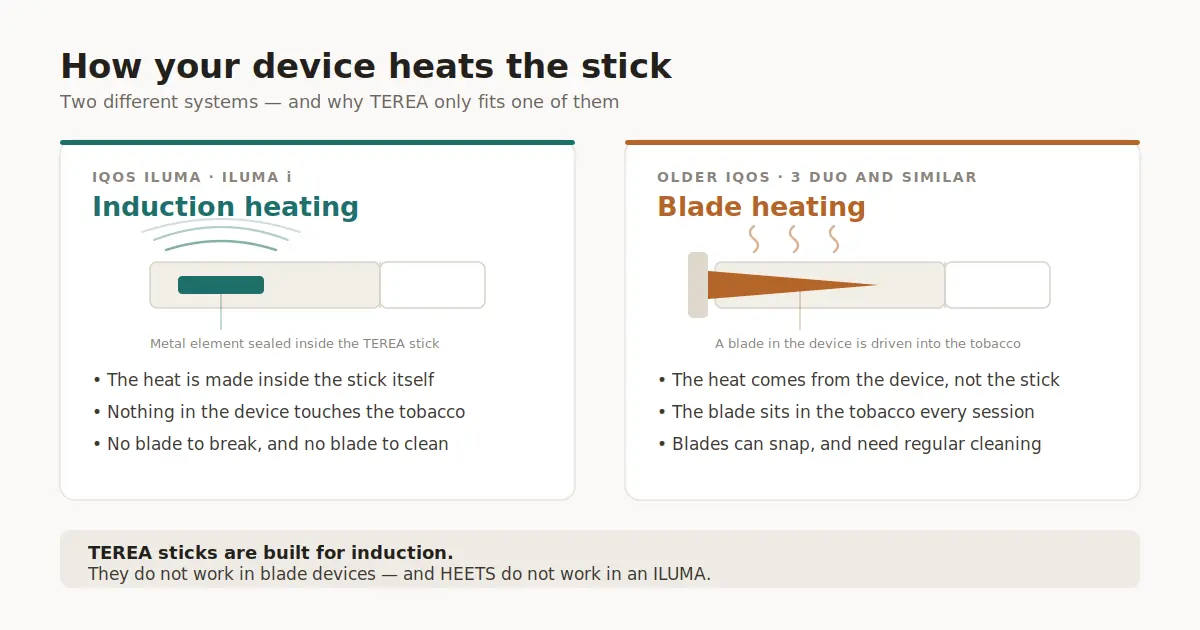
TEREA is designed for IQOS ILUMA and ILUMA i devices. It is not compatible with older blade-based IQOS models such as IQOS 3 DUO. HEETS and BLENDS belong to other device families. See the complete compatibility table before ordering sticks.
How to start an experience
- Remove one TEREA stick from the pack.
- Insert it straight into the chamber up to the printed line. Do not force or twist it.
- Follow the start prompt for the exact device model. Some ILUMA i models support Auto Start; controls and indicators differ by model.
- Wait for the ready indication shown in the supplied guide.
- When the device signals that the experience has ended, remove the used stick and dispose of it responsibly.
What not to do
- Do not use TEREA in a blade-based IQOS device.
- Do not insert HEETS or BLENDS into IQOS ILUMA.
- Do not force a damaged stick into the chamber.
- Do not use unsupported temperature, puff-count or health claims to compare models.
ILUMA does not use the old blade-cleaning routine. For chamber, charging-port and moisture care, read our IQOS ILUMA cleaning and maintenance guide.
Charging and status lights
Charging behaviour varies between the all-in-one i One and models with a separate holder and pocket charger. Use the supplied cable and model instructions. The IQOS ILUMA light guide explains common white, yellow and red indications using manufacturer information.
If the device does not start
Confirm that the device is charged, the stick says TEREA and it is inserted to the printed line. Remove and replace a damaged stick. If the device still does not respond, follow the six-step ILUMA troubleshooting guide and then consult the supplied support information for your model.
Choosing an ILUMA model
Compare the all-in-one i One with holder-and-charger models by form factor, controls and current listed price. The ILUMA model comparison covers the current range without claiming that one device is universally best.
UAE ordering information
For products marked in stock, TereaStore ships within one hour. Normal delivery is 1–2 hours in Dubai, Sharjah and Ajman and 12–24 hours in the other emirates, daily from 6 AM to midnight. Delivery is free on orders over 299 AED.
Adults 21+ only. TEREA contains nicotine, which is addictive. Heated-tobacco products are not risk-free.
Buy what this guide covers
- the entry-level ILUMA i One
- TEREA Sienna for full-flavour adult nicotine users
- TEREA Bronze as a second option
- all ILUMA devices
Free delivery over 299 AED · 1–2 hours in Dubai, Sharjah and Ajman · cash on delivery in all 7 emirates
Keep reading

Related Posts
Heat-Not-Burn Tobacco in the UAE: Devices, Sticks & Compatibility

IQOS ILUMA i vs Original ILUMA: UAE Upgrade Comparison
How to Read a TEREA Pack Before Using It in IQOS ILUMA
TEREA Flavour Guide UAE: Compare Regular, Menthol and Pearl
IQOS ILUMA vs Lambda: Which Heat-Not-Burn Device Is Better for Dubai Users in 2024?
1–2 Hour TEREA Delivery in Dubai and UAE
Get your favorite IQOS TEREA flavors delivered quickly across Dubai. Delivery daily 6 AM – 12 midnight.